2025 & 2026
- Access the accreditation site on your desktop - Claim 2025 Credit / Claim 2026 Credit
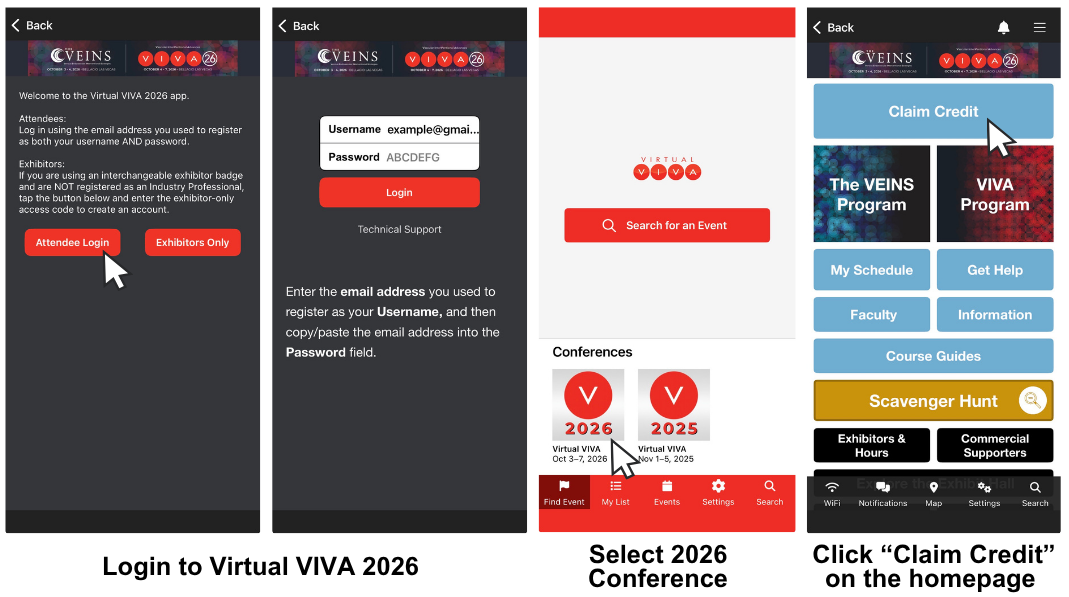
OR download the Virtual VIVA 2026 app from the App Store or Google Play - Download here. - To log into the desktop site or mobile app, use your registration email as your username AND password.
Using the mobile app:
- Select the conference you are claiming credit for and follow the prompts until you reach the homepage.
- Tap the “Claim Credit” button at the top of the homepage to complete the conference evaluation, claim credit hours, and download your certificate(s).
2024
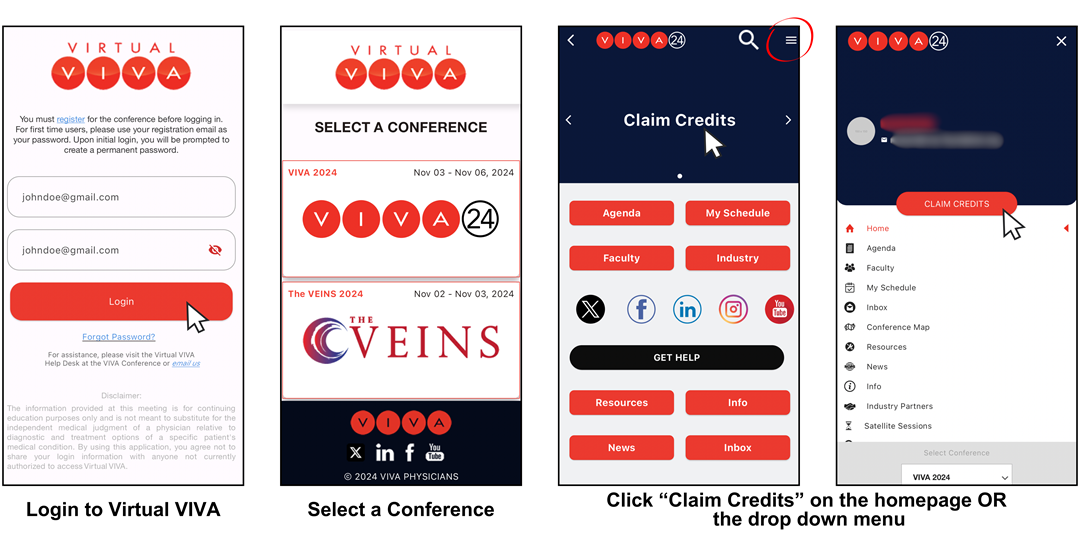
- Download the Virtual VIVA app from the App Store or Google Play
- Login to Virtual VIVA using your registration email and password. If logging in to Virtual VIVA for the first time in 2024, use your registration email address as both your username AND password. You will then be prompted to create a new password.
- Select a conference.
- Click "claim credits" on the conference homepage or in the dropdown menu.
- Follow the prompts on screen to complete the 2024 evaluation and claim credit.
Please direct all CME-related questions to cme@viva-foundation.org.